The results in short
At default settings PicoDiet keeps more quality than the others, so its files are often bigger. Tested 6–7 November 2026.
Which tools broke what
✓ worked ! flaws you see up close ✗ broken, rejected or not compressed – not offered
| Tool | Photos | iPhone colours | HEIC | Transparent PNG | Gradients | Screenshots | Animated GIF |
|---|---|---|---|---|---|---|---|
| PicoDiet | ✓ | ✓ | ✓ | ✓ | ✓ | ✓ | ✓ |
| TinyPNG | ✓ | ✓made sRGB | ✗rejected | ✓ | !grain | ✓ | ✗rejected |
| Squoosh | ✓ | ✓made sRGB | ✗won't open | ✗turns black | ✗turns black | ✓as JPEG | ✗still image |
| iLoveIMG | ✓ | ✗colour shift | ✗skipped | ✓ | !grain | ✓ | ✗streaks |
| compress*.com | ✓ | ✓ | –not tried | ✓ | ✗banding | ✓ | ✗unchanged |
| optimizepng | – | – | – | ✓ | !grain | ✗speckles | – |
| ezgif | – | – | – | – | – | – | ✗streaks |
compress*.com covers compressjpeg.com, compresspng.com, compressgif.com and imagecompressor.com, which gave identical files. "Made sRGB" looks right on most screens but loses the extra-vivid reds and greens on iPhones and Macs.
See the damage
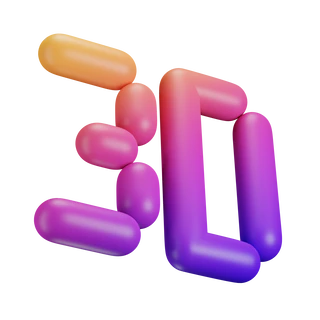 Original
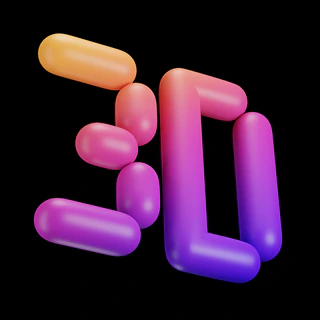 ✗ Squoosh
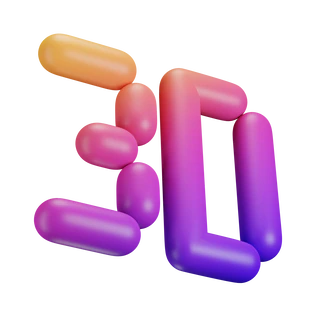 ✓ PicoDiet
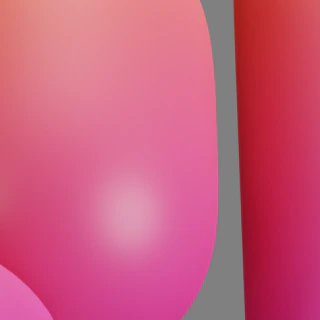 Original
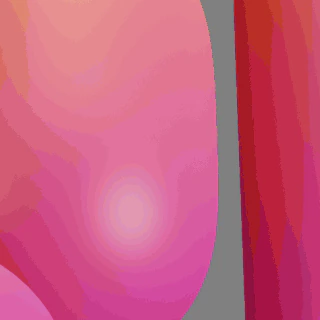 ✗ compresspng
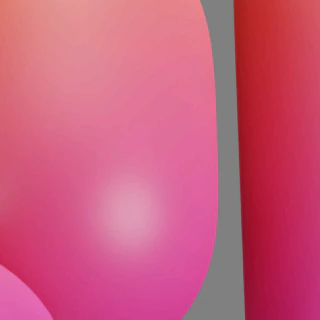 ✓ PicoDiet
 Original
 ✗ iLoveIMG
 ✓ PicoDiet
Who makes the smallest files at the same quality?
To compare fairly, we set PicoDiet's Quality slider to each tool's own score, file by file, and compared the file sizes:
| Against | Photos | PNG |
|---|---|---|
| TinyPNG | PicoDiet 25% smaller | PicoDiet 12% smaller |
| Squoosh | PicoDiet 7% smaller | – |
| iLoveIMG | PicoDiet 17% smaller | PicoDiet 5% biggertheirs lost more detail |
| compress*.com | PicoDiet 16% smaller | PicoDiet 7% biggertheirs lost more detail |
| optimizepng | – | PicoDiet 9% smaller |
Photos: PicoDiet's were the smallest against every tool. PNG: smaller than TinyPNG's and optimizepng's. iLoveIMG and compress*.com came out a little smaller only on the images where they lost more detail than PicoDiet allows, such as the flower edges and the app screenshot.
File sizes at default settings
Each tool aims at a different quality by default. PicoDiet aims at a score of 80 (looks the same side by side); the others landed between 63 and 76 on photos, so their photos were smaller but lost more.
Size · SSIMULACRA2 score (90+ indistinguishable, 80 same side by side, 70 hard to notice, under 60 visible). Green: smallest file that keeps the quality. Orange: smaller, but more detail lost (a lower score, or a spot changed more than PicoDiet allows). ! flaws up close. ✗ visibly broken.
Photos
| Image | PicoDiet | TinyPNG | Squoosh | iLoveIMG | compressjpeg |
|---|---|---|---|---|---|
| Harbour, DSLR 4.97 MB | 666 KB · 80 | 285 KB · 67 | 287 KB · 73 | 320 KB · 73 | 450 KB · 75 |
| Sunset sky 1.31 MB | 457 KB · 79 | 309 KB · 72 | 237 KB · 72 | 275 KB · 72 | 394 KB · 76 |
| Sunset, pre-compressed 509 KB | 414 KB · 81 | 310 KB · 72 | 169 KB · 63 | 206 KB · 66 | unchanged |
| Portrait, iPhone (P3) 2.53 MB | 740 KB · 77 | 612 KB · 66 | 786 KB · 76 | 827 KB · 71 | 1.01 MB · 81 |
PicoDiet scores the iPhone portrait in its own wide colours, where it reaches 80; this table measures on a standard screen.
PNG: transparency, graphics, screenshots
| Image | PicoDiet | TinyPNG | iLoveIMG | optimizepng | compresspng |
|---|---|---|---|---|---|
| Flowers cut-out 869 KB | 374 KB · 86 | 221 KB · 81 | 238 KB · 81 | 204 KB · 76 | 237 KB · 79 |
| 3D icon 2.70 MB | 468 KB · 86 | 454 KB · 72 | 613 KB · 71 | 581 KB · 72 | 171 KB · 52 |
| Logo 131 KB | 39 KB · 100 | 51 KB · 89 | 33 KB · 85 | 44 KB · 77 | 41 KB · 100 |
| Illustration 3.40 MB | 527 KB · 81 | 1.00 MB · 88 | 769 KB · 85 | 757 KB · 84 | 977 KB · 89 |
| Text screenshot 380 KB | 113 KB · 93 | 123 KB · 94 | 107 KB · 89 | 112 KB · 88 | 127 KB · 95 |
| App screenshot 2.07 MB | 1.33 MB · 85 | 669 KB · 83 | 515 KB · 69 | 491 KB · 64 | 603 KB · 76 |
Squoosh isn't listed: it turned every PNG into a JPEG.
Animated GIF
| Image | PicoDiet | ezgif | iLoveIMG | compressgif |
|---|---|---|---|---|
| 3D, 27 frames 6.98 MB | 4.45 MB · 83 | 1.42 MB · 51 | 1.65 MB · 56 | unchanged |
| Retro, 62 frames 2.13 MB | unchanged | 1.22 MB · 84 | 1.25 MB · 85 | unchanged |
TinyPNG rejected the GIFs and Squoosh kept one frame. On the retro animation ezgif and iLoveIMG saved 41–42%; PicoDiet found no smaller GIF that kept 80 in every frame.
HEIC: only PicoDiet opened the iPhone photo, 1.38 MB in, a 776 KB JPEG out with its colours kept.
How we tested
- Images: 11 public-domain (CC0) images from Wikimedia Commons and 2 screenshots of PicoDiet: harbour, sunset sky, sunset over water, iPhone portrait, iPhone photo as HEIC, flowers, 3D icon, logo, illustration, 3D animation, retro animation.
- Tools: free web versions at default settings, one run each: TinyPNG, Squoosh, iLoveIMG, compress*.com, optimizepng.com and ezgif on 6 November 2026, PicoDiet on 7 November.
- Quality: SSIMULACRA2 and Butteraugli from libjxl, on colour-managed pixels, so colour changes count. Animations are compared frame by frame. Every flaw marked above was checked by eye.
- Not tested: paid plans, APIs, other settings, desktop apps.


Questions
Which free image compressor is best?
In our test PicoDiet was the only one that broke nothing, and its photos were the smallest at the same quality. TinyPNG was the strongest of the others: it broke nothing badly, but rejects GIF and HEIC. Squoosh is best for tuning one image by hand without uploading it.
Which compressor makes the smallest files?
At default settings Squoosh and TinyPNG made the smallest photos and iLoveIMG often the smallest PNGs, mostly by lowering quality (scores 63–76). At the same quality PicoDiet's photos were 7–25% smaller than each of theirs, and its PNGs 12% smaller than TinyPNG's.
Why are PicoDiet's files bigger at default settings?
It aims at a score of 80, where the result looks the same as the original side by side. Move the Quality slider to 70 for files closer in size to the others'.
Which compressors keep transparency and GIF animation?
Transparency: TinyPNG, iLoveIMG, optimizepng, compresspng and PicoDiet. Squoosh's default JPEG turns it black. Animation: ezgif, iLoveIMG and PicoDiet. TinyPNG rejects GIFs and Squoosh keeps one frame.
Which is fastest?
Squoosh, at 1–1.5 seconds per photo, since it runs in your browser. The upload tools took 3–40 seconds per batch, and PicoDiet 1.5–7.5 seconds per image, because it tries several settings and measures each.
Can I repeat the test?
Yes. All images are linked above and every tool ran at its defaults. Score the results with ssimulacra2 and butteraugli_main from libjxl.
Are my images private?
Yes. Images are uploaded over an encrypted connection to the nearest of our servers, optimized, and deleted within 3 minutes after you finish. They are never shared, sold or used for training, and there is no account to sign up for. Details are in the privacy policy.